
How to migrate from Excel or Google Sheets
CSV import and column mapping.
CSV import and column mapping. In short: Expense Trail helps you migrate spreadsheet expenses with manual logging on iOS, Android, and web—no bank linking, no ads on core features. Follow the steps below, then use the product docs for screen-by-screen detail.
Before you start
Export or back up before bulk import. Expense Trail does not scrape banks—CSV/spreadsheet import is manual. See Data import for column mapping.
Steps
Export or back up before bulk import or reset.
You should see: You have a rollback file.
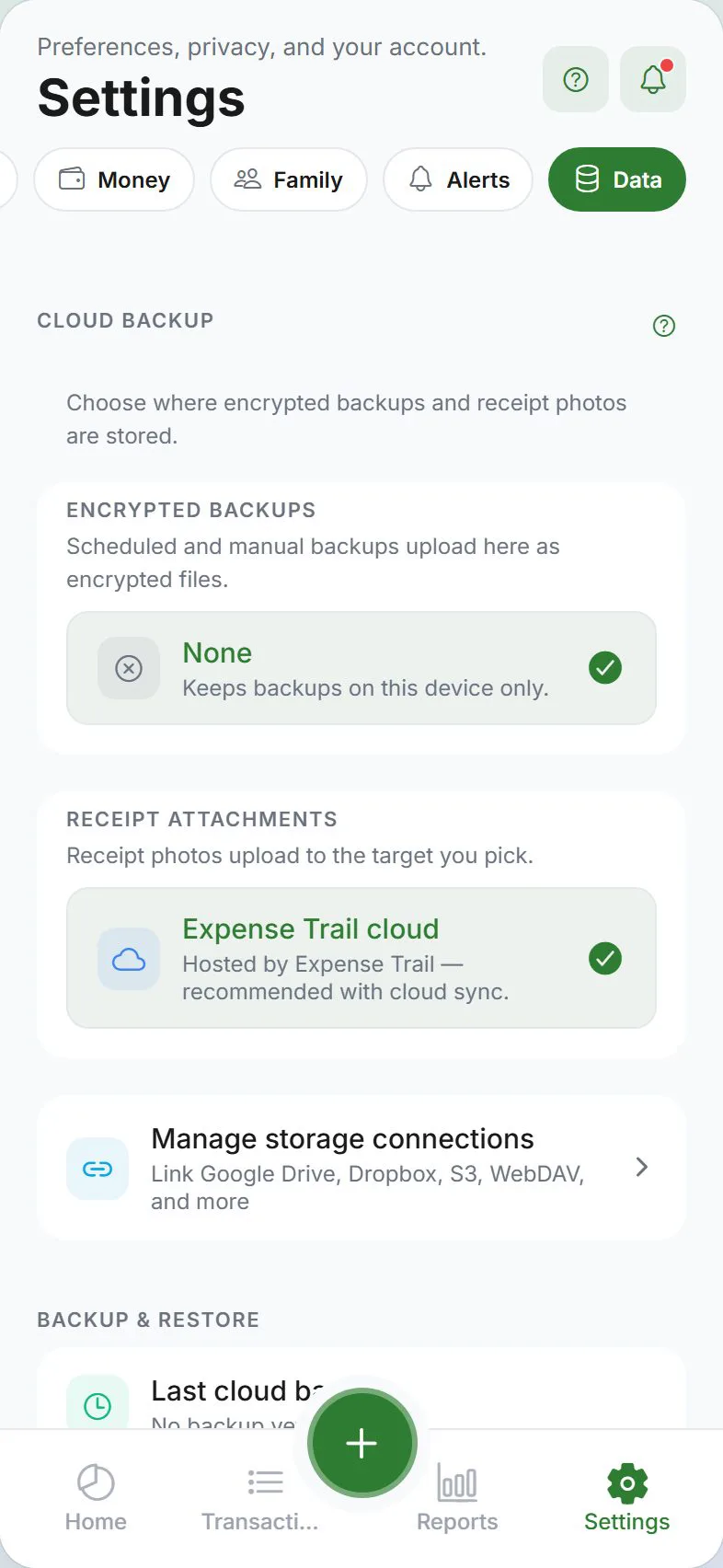
Open Settings → Data for import, export, or cloud backup.
You should see: Data hub lists available actions.
Follow format rules in the product doc (CSV columns, encrypted JSON).
You should see: Preview or validation passes.
Run import/export on Wi‑Fi for large attachments.
You should see: Progress completes without timeout.
Verify counts in Transactions after import.
You should see: Row totals match expectations.
Common mistakes
- Importing without wallet mapping — Every row needs a wallet column or default wallet.
- Unencrypted backup on shared drives — Use encrypted export for sensitive ledgers.
- Assuming OCR — Attachments are photos/PDFs you store; we do not auto-parse receipt text unless shipped.
Why this approach works
Spreadsheets break on mobile; cloud folders lose structure. Import, export, encrypted backup, and BYOS storage put you in control of file format and location—critical before device upgrades or tax-season prep. CSV import and column mapping.
Quick answer (migrate spreadsheet expenses)
CSV import and column mapping. Use Expense Trail on iOS, Android, or web; core features are free without ads. You log each line manually—there is no bank feed to reconcile later.
Featured-snippet style: CSV import and column mapping. Expense Trail uses manual entry—add wallets and categories, follow the steps above, and review Reports weekly. No bank linking; guest mode works without an account.
Tips that stick
- Set default wallet and default category under Settings so repeat logging takes seconds.
- Log the expense the same day—memory fades and group splits get disputed.
- Once per week, open Reports and scan for empty days or categories over 80% of budget.
- Link related tasks in Learn hub instead of duplicating long product docs here.
Troubleshooting
- Totals look wrong — Search Transactions for duplicates, wrong dates, or expenses logged instead of transfers.
- Feature missing on web vs mobile — Some platform tools (widgets, geofence) are mobile-only; see platform guides.
- Still stuck — Open the product doc linked below for screen-by-screen paths; concept pages explain why wallets, categories, and budgets differ.
Related concepts
From Excel or Google Sheets without losing structure
Migrate spreadsheet expenses via Settings → Data → Import. Map columns to date, amount, wallet, category, and note—every row needs a wallet. Categories must exist before import or map to defaults. Keep your old sheet as backup; Expense Trail does not auto-sync back to Excel. For Mint or YNAB switchers, also read migrate from Mint.
Your data, your files
People search "migrate spreadsheet expenses" when leaving spreadsheets or switching phones. CSV import maps columns to wallets and categories; encrypted export produces a password-protected file you store. Optional cloud backup and BYOS (S3, WebDAV) keep attachments out of our storage if you prefer—document your passphrase offline.
Frequently asked questions
Migrate from Excel or Google Sheets—do I need an account?
Guest mode works for local-only tracking. Sign in with Google or Apple if you need cloud sync, household, or push alerts. See use without an account.
Does Expense Trail link to my bank?
No. Expense Trail is manual entry only. You log amounts you choose; we do not pull bank transactions.
What if something looks wrong after I finish?
Check Transactions for duplicate or backdated lines. For wallet totals, use balance adjustments rather than fake expenses.
How long does setup take?
Most users finish in 10–20 minutes if wallets and categories already exist. Add buddies or household invites when everyone has the app installed.
Can I do this on web and mobile?
Yes—Expense Trail syncs when signed in (or use guest/LAN for offline-first workflows). Widgets and geofence are mobile-only.
Is Expense Trail free for this?
Core tracking, budgets, splits, and export are free without ads. See Is Expense Trail really free?.
Is this financial advice?
No—this guide explains product setup only. For tax, legal, or investment decisions, consult a qualified professional.